
MTK_GMG Example 2 (Unzen)
This page documents the coding style used in examples/MTK_GMG_2D_example2.jl, to simulate the magmatic system beneath the Unzen volcano.
GPU / CPU Selection
At the very top of the script, before any other using statements, you must declare whether to run on the GPU or CPU:
const USE_GPU = false     # set to true to run on an NVIDIA GPU
if USE_GPU
    using CUDA
end
using ParallelStencil, ParallelStencil.FiniteDifferences2D
using MagmaThermoKinematics

@static if USE_GPU
    environment!(:gpu, Float64, 2)
    CUDA.device!(0)                      # select the GPU (0-indexed)
    @init_parallel_stencil(CUDA, Float64, 2)
else
    environment!(:cpu, Float64, 2)
    @init_parallel_stencil(Threads, Float64, 2)
end

using MagmaThermoKinematics.Diffusion2D  # must be loaded AFTER environment!()
using MagmaThermoKinematics.Fields2D
using MagmaThermoKinematics.MTK_GMG_2D
USE_GPU must be a const so that @static if branches are resolved at compile time. The environment! call and @init_parallel_stencil must come before any solver code is loaded.
GeophysicalModelGenerator-Driven Setup
We start with loading the topography of a region, creating a 3D model setup:
# NOTE: topography preparation is typically done once and loaded from file
#  see the GeophysicalModelGenerator docs on how to compute this for an arbitrary place
Topo_cart = load_GMG("Topo_cart")

X,Y,Z       = xyz_grid(-23:.1:23,-19:.1:19,-20:.1:5)
Data_set3D  = CartData(X,Y,Z,(Phases=zeros(Int64,size(X)),Temp=zeros(size(X))))
Note that the 3D dataset should have Phases and Temp as arrays.
Next, we create a 2D cross-section through this 3D model with a specified resolution:
Nx = 135*6
Nz = 135*4
Data_2D = cross_section(Data_set3D, Start=(-20,4), End=(20,4), dims=(Nx, Nz))
Data_2D = addfield(Data_2D, "FlatCrossSection", flatten_cross_section(Data_2D))
Data_2D = addfield(Data_2D, "Phases", Int64.(Data_2D.fields.Phases))
You can add topography with this. Everything above the topography is set to Phases=0.
Below = below_surface(Data_2D, Topo_cart)
Data_2D.fields.Phases[Below] .= 1
@views Data_2D.fields.Phases[Data_2D.z.val .< -30.0] .= 2
Material Parameters
Material properties for each phase are defined with SetMaterialParams from GeoParams. The MatParam tuple must have one entry per phase, with phases numbered from 0. Phase 0 is conventionally used for air/above-topography cells.
MatParam = (
    SetMaterialParams(Name="Air", Phase=0,
        Density      = ConstantDensity(ρ=2700kg/m^3),
        LatentHeat   = ConstantLatentHeat(Q_L=0.0J/kg),
        Conductivity = ConstantConductivity(k=3Watt/K/m),
        HeatCapacity = ConstantHeatCapacity(Cp=1000J/kg/K),
        Melting      = SmoothMelting(MeltingParam_4thOrder())),
    SetMaterialParams(Name="Crust", Phase=1,
        Density      = ConstantDensity(ρ=2700kg/m^3),
        LatentHeat   = ConstantLatentHeat(Q_L=3.13e5J/kg),
        Conductivity = T_Conductivity_Whittington_parameterised(),
        HeatCapacity = ConstantHeatCapacity(Cp=1000J/kg/K),
        Melting      = SmoothMelting(MeltingParam_4thOrder())),
    SetMaterialParams(Name="Mantle", Phase=2,
        Density      = ConstantDensity(ρ=2700kg/m^3),
        LatentHeat   = ConstantLatentHeat(Q_L=3.13e5J/kg),
        Conductivity = T_Conductivity_Whittington_parameterised(),
        HeatCapacity = ConstantHeatCapacity(Cp=1000J/kg/K)),
    SetMaterialParams(Name="Dikes", Phase=3,
        Density      = ConstantDensity(ρ=2700kg/m^3),
        LatentHeat   = ConstantLatentHeat(Q_L=3.13e5J/kg),
        Conductivity = T_Conductivity_Whittington_parameterised(),
        HeatCapacity = ConstantHeatCapacity(Cp=1000J/kg/K),
        Melting      = SmoothMelting(MeltingParam_4thOrder())),
)
Key choices in this setup:
Melting —
SmoothMelting(MeltingParam_4thOrder())uses the Marxer & Ulmer parameterisation wrapped in a smoothing function to ensure a continuous(required for numerical stability; see Numerics). Conductivity —
T_Conductivity_Whittington_parameterised()provides a temperature-dependent conductivity for rock; air uses a constant value.Latent heat — set to zero for the air phase since no melting occurs above the topography.
DikePhase — the
DikeParambelow usesDikePhase=3, so injected material is assigned the "Dikes" material properties.
See the GeoParams parameterisations page for all available options.
Time-Dependent Diagnostics Hook
We specify a few custom time-dependent properties with:
@with_kw mutable struct TimeDepProps1 <: TimeDependentProperties
    Time_vec::Vector{Float64}       = []
    MeltFraction::Vector{Float64}   = []
    Tav_magma::Vector{Float64}      = []
    Tmax::Vector{Float64}           = []
    Tmax_1::Vector{Float64}         = []
end

function MTK_GMG.MTK_update_TimeDepProps!(time_props::TimeDependentProperties, Grid::GridData, Num::NumericalParameters, Arrays::NamedTuple, Mat_tup::Tuple, Dikes::DikeParameters)
    push!(time_props.Time_vec, Num.time)
    push!(time_props.MeltFraction, sum(Arrays.ϕ)/(Num.Nx*Num.Nz))
    push!(time_props.Tmax, maximum(Arrays.T))
    return nothing
end
Parameter Setup and Run
The numerical parameters are set with:
Num = NumParam(
    SimName             = "Unzen1",
    dim                 = 2,
    maxTime_Myrs        = 0.005,
    SaveOutput_steps    = 25,
    CreateFig_steps     = 5,
    USE_GPU             = USE_GPU,
    ω                   = 0.5,
    AddRandomSills      = true,
    RandomSills_timestep= 5,
)
Note that the resolution is taken from the size of the Data_2D array. Dike parameters are set with:
Dike_params = DikeParam(
    Type                   = "ElasticDike",
    InjectionInterval_year = 1000,
    W_in                   = 5e3,
    H_in                   = 250,
    H_ran                  = 5000,
    W_ran                  = 5000,
    nTr_dike               = 2000,
    Dip_ran                = 45,
    DikePhase              = 3,
    SillsAbove             = -10e3,
)
Finally, run the simulation with:
Grid, Arrays, Tracers, Dikes, time_props = MTK_GeoParams_2D(
    MatParam,
    Num,
    Dike_params,
    CartData_input = Data_2D,
    time_props     = TimeDepProps1(),
)
The USE_GPU flag passed to NumParam must match the environment! call at the top of the script.
Full Example File
The result of the simulation looks like this:
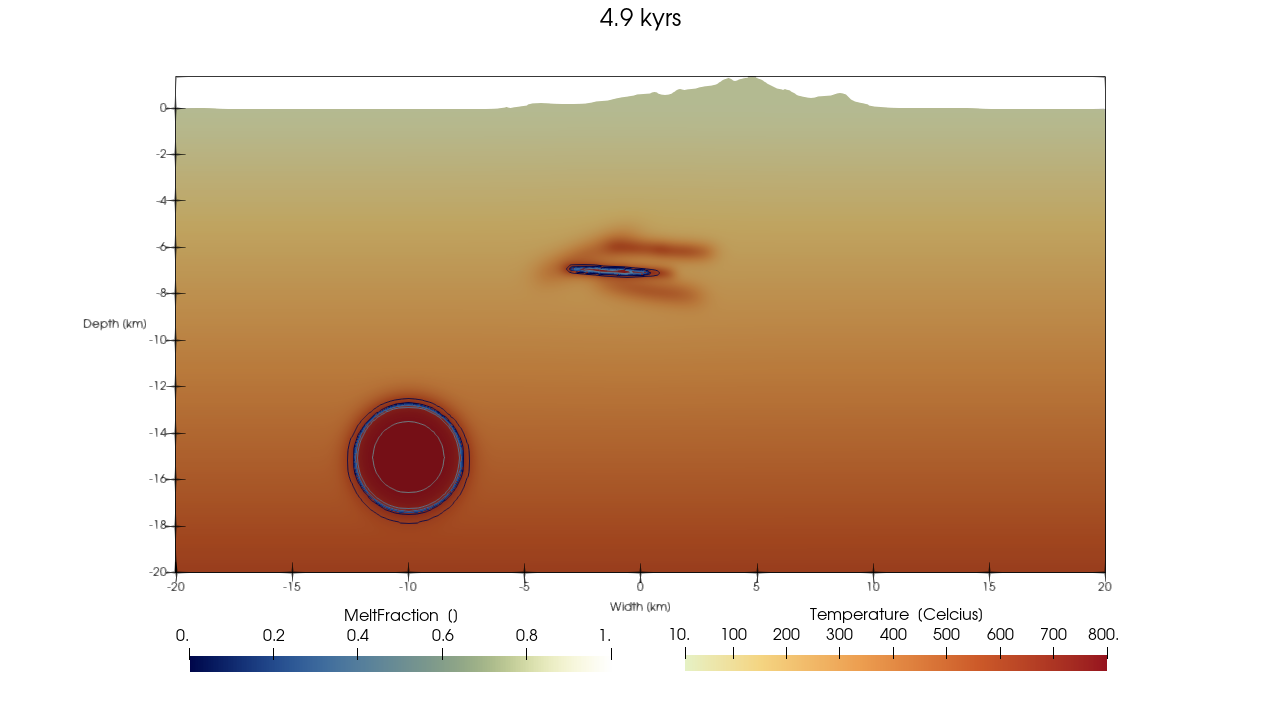 Note that this file is generated with Paraview, and contains statefile info such that you can reproduce it on Paraview 6.1 or newer.
The complete, runnable script is available at examples/MTK_GMG_2D_example2.jl.