
MTK_GMG 3D Examples
This page follows the same style as the 2D MTK_GMG examples, but for 3D setups. It allows you to adapt a simulation to any location .
Using MTK_GMG for real volcanic systems
These examples show that the same MTK_GMG solver pipeline can be reused across different volcanic systems by changing setup data and runtime choices instead of rewriting the core numerics. The main code does not have to be changed if you want to do things such as change the location of magma intrusions over time, or store particular datasets. All can be specified in the input file, which makes this approach very flexible and reproducible (just make sure to report the exact version of MTK you employed).
We will show two examples here:
Unzen3Ddemonstrates a workflow where the model domain, phase structure, and thermal state are assembled from imported topography and project-specific initialization logic.Lanin3Ddemonstrates a workflow where a custom topography is downloaded using GMT if the file doesn't exist, and a custom output hook is defined to print time and iteration diagnostics.Both examples use the same core concepts:
CartDatasetup construction (using the GeophysicalModelGenerator package), material parameter definition (using GeoParams), dike parameterization, and a customization of simulation paramaters such as output and diagnostics. With this, all aspects of the simulation can be controlled and customized in a single file.
In practice, this means MagmaThermoKinematics.jl can move from synthetic benchmark setups to real-world applications by swapping geological input data and user hooks while keeping the computational framework stable.
Example 1: Unzen3D
This section documents the script in examples/MTK_GMG_3D_example.jl which focusses on Mount Unzen in Japan and produces the following script: 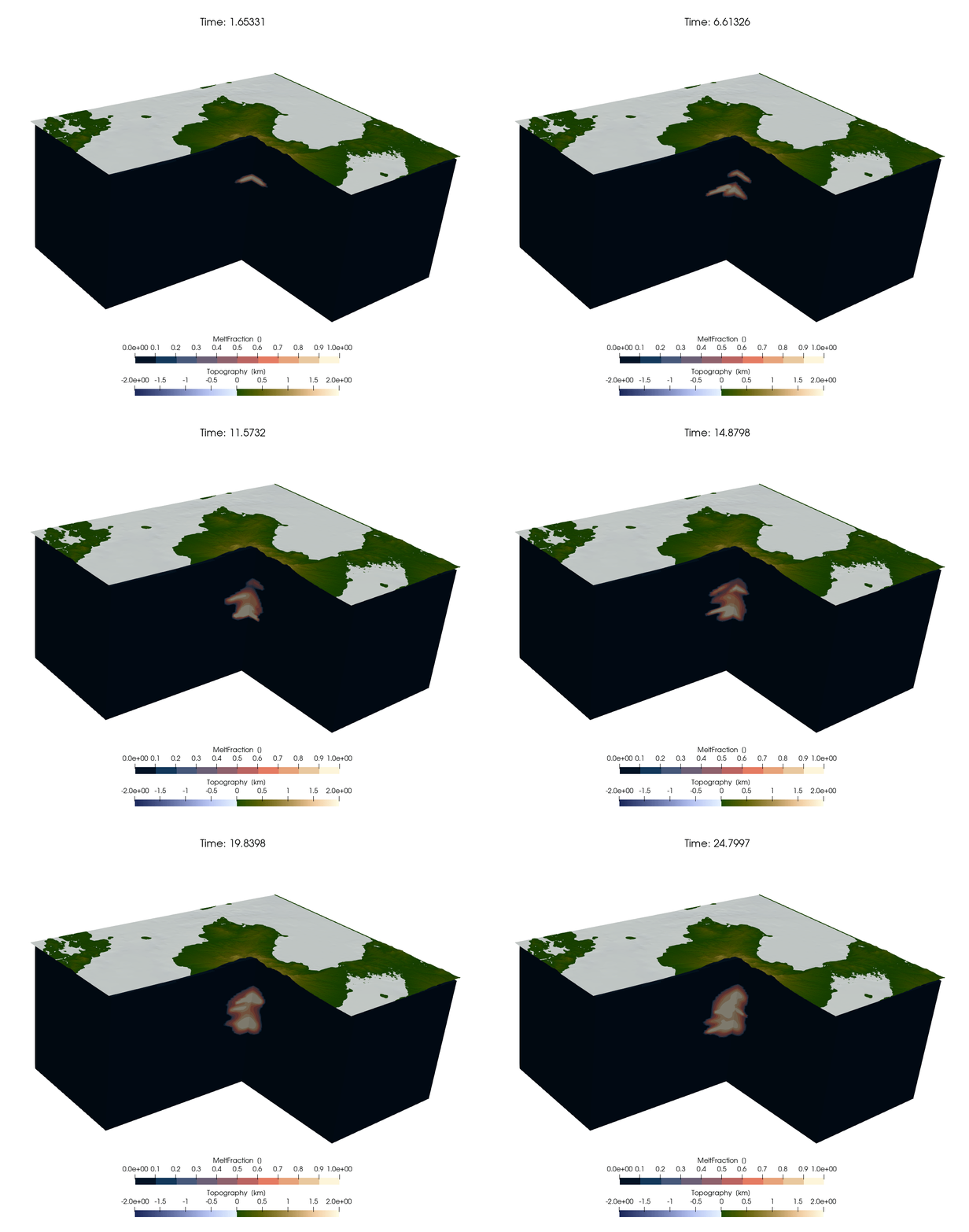
Imports and Backend
As always, we start with loading the required input:
const USE_GPU = false
if USE_GPU
	using CUDA
end

using MagmaThermoKinematics
@static if USE_GPU
	environment!(:gpu, Float64, 3)
	CUDA.device!(1)
else
	environment!(:cpu, Float64, 3)
end
using MagmaThermoKinematics.Diffusion3D
using MagmaThermoKinematics.Fields3D
using MagmaThermoKinematics.MTK_GMG
using MagmaThermoKinematics.MTK_GMG_3D
using Random, GeoParams, GeophysicalModelGenerator
GeophysicalModelGenerator Setup
The GMG package is used to generate the 3D setup (and can also be used to import screenshots, seismic tomography models, seismicity and all other data that is available). We also load the topography from disk, and set the Phases below the topography to 1:
Topo_cart = load_GMG(joinpath(@__DIR__, "Topo_cart"))
Nx, Ny, Nz = 100, 100, 100
X, Y, Z = xyz_grid(range(-23, 23, length = Nx),
				   range(-19, 19, length = Ny),
				   range(-20, 5, length = Nz))
Data_3D = CartData(X, Y, Z, (Phases = zeros(Int64, size(X)), Temp = zeros(size(X))))

Below = below_surface(Data_3D, Topo_cart)
Data_3D.fields.Phases[Below] .= 1
Likewise, we set a Moho, and initialize a temperature structure.
Parameter Setup and Run
The numerical and dike parameters are:
Num         = NumParam( SimName="Unzen3D", axisymmetric=false,
                        maxTime_Myrs=0.025,
                        fac_dt=0.2,
                        SaveOutput_steps=20, CreateFig_steps=1000, plot_tracers=false, advect_polygon=false,
                        USE_GPU=USE_GPU,
                        AddRandomSills = true, RandomSills_timestep=5);
# dike parameters
Dike_params = DikeParam(Type="ElasticDike",
                        InjectionInterval_year = 1000,       # flux= 14.9e-6 km3/km2/yr
                        W_in=5e3, H_in=250*4,
                        nTr_dike=300*1,
                        H_ran = 5000, W_ran = 5000,
                        DikePhase=3, BackgroundPhase=1,
                        Center=[0.0,0.0, -7000], Angle=[0.0, 0.0],
                )
Material properties are as follows:
MatParam     = (SetMaterialParams(Name="Air", Phase=0,
                                Density    = ConstantDensity(ρ=2700kg/m^3),
                                LatentHeat = ConstantLatentHeat(Q_L=0.0J/kg),
                                Conductivity = ConstantConductivity(k=3000Watt/K/m),       # in case we use constant k
                                HeatCapacity = ConstantHeatCapacity(Cp=1000J/kg/K),
                                Melting = SmoothMelting(MeltingParam_4thOrder())),         # Marxer & Ulmer melting

                SetMaterialParams(Name="Crust", Phase=1,
                                Density    = ConstantDensity(ρ=2700kg/m^3),
                                LatentHeat = ConstantLatentHeat(Q_L=3.13e5J/kg),
                                Conductivity = T_Conductivity_Whittington_parameterised(),   # T-dependent k
                                HeatCapacity = ConstantHeatCapacity(Cp=1000J/kg/K),
                                Melting = SmoothMelting(MeltingParam_4thOrder())),      # Marxer & Ulmer melting

                SetMaterialParams(Name="Mantle", Phase=2,
                                Density    = ConstantDensity(ρ=2700kg/m^3),
                                LatentHeat = ConstantLatentHeat(Q_L=3.13e5J/kg),
                                Conductivity = T_Conductivity_Whittington_parameterised(),   # T-dependent k
                                HeatCapacity = ConstantHeatCapacity(Cp=1000J/kg/K)),

                SetMaterialParams(Name="Dikes", Phase=3,
                                Density    = ConstantDensity(ρ=2700kg/m^3),
                                LatentHeat = ConstantLatentHeat(Q_L=3.13e5J/kg),
                                Conductivity = T_Conductivity_Whittington_parameterised(),   # T-dependent k
                                HeatCapacity = ConstantHeatCapacity(Cp=1000J/kg/K),
                                Melting = SmoothMelting(MeltingParam_4thOrder()))      # Marxer & Ulmer melting
                )
Finally, the simulation is performed as:
Grid, Arrays, Tracers, Dikes, time_props =
	MTK_GMG_3D.MTK_GeoParams_3D(MatParam, Num, Dike_params, CartData_input = Data_3D)
Which looks like: 
Here, the isosurface indicates the area with eruptable melt (>50% melt content). Note that this is a Paraview PNG file, which can be reproduced with Paraview 6.1 or newer (open with Load State...).
Example 2: Lanin 3D
This section documents the scripts:
which is a 3D simulation of (hypothetical) magma injection below Lanin. 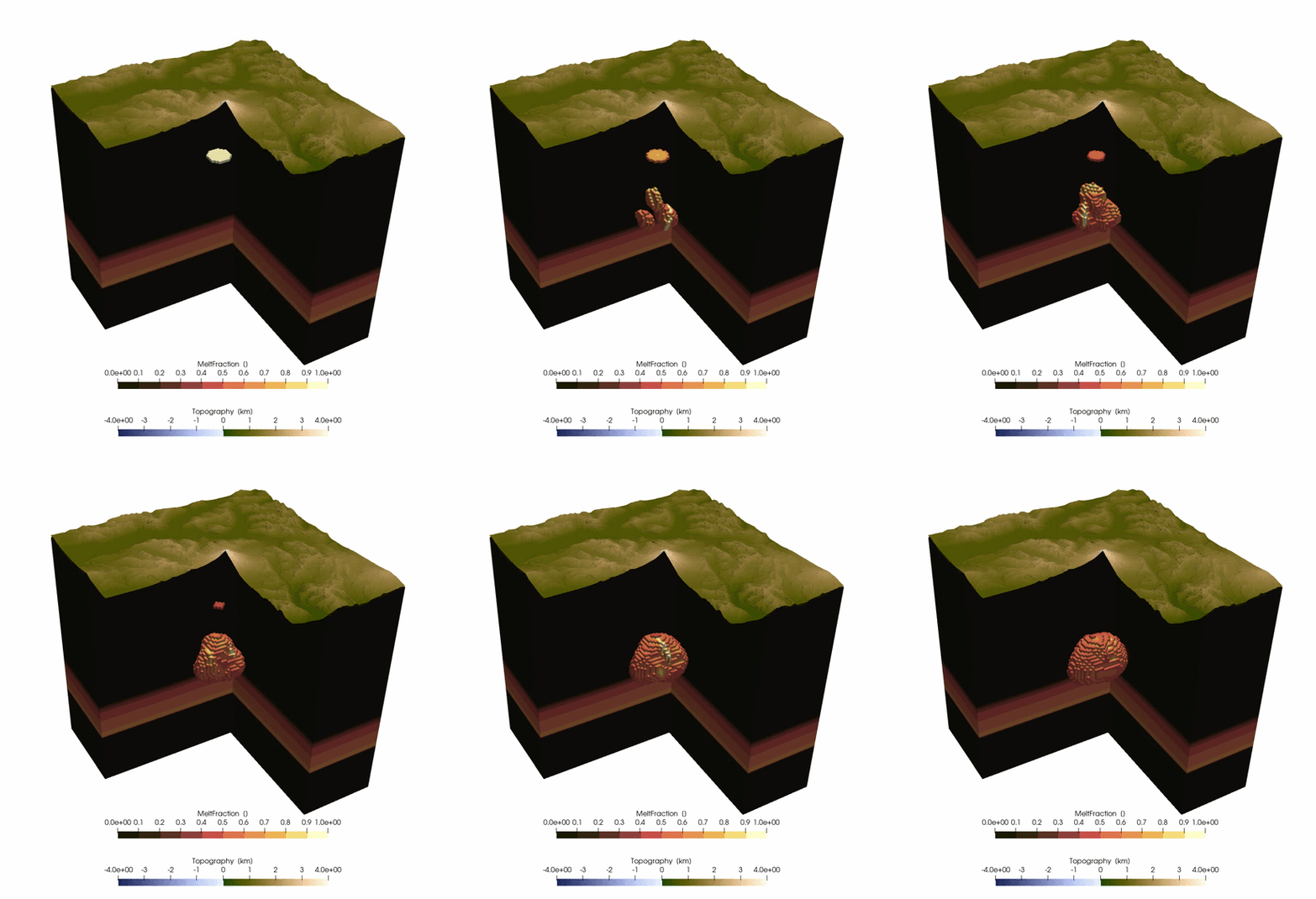
Custom Setup Builder
Many parts of the scripts are the same as in the previous example and are thus not repeated here. In the case of Lanin, we also download the topography and save it to disk if that file does not exist yet (which requires you to install the GMT package):
# Create 3D grid of the region
if !isfile(joinpath(@__DIR__,"Topo_cart_Lanin3D.jld2"))
    using GMT, Statistics
    println("Creating topography grid from GMG for Lanin 3D example...")
    Topo       =   import_topo(lon = [-71.9, -71.1], lat=[-39.95, -39.35], file="@earth_relief_01s.grd")
    proj       =   ProjectionPoint(; Lat=mean(Topo.lat.val), Lon=mean(Topo.lon.val))
    Topo_cart  =   convert2CartData(Topo, proj)

    Xt,Yt,Zt   =   xyz_grid(-20:.025:20,-20:.025:20,0)
    Topo_cart  =   project_CartData(CartData(Xt,Yt,Zt,(Zt=Zt,)), Topo, proj)
    write_paraview(Topo_cart,joinpath(@__DIR__,"Topo_cart_Lanin3D"));

    save_GMG(joinpath(@__DIR__,"Topo_cart_Lanin3D"), Topo_cart)
end
Hooks and Run
We also adjust the printing info that is shown during the simulation with:
import MagmaThermoKinematics.MTK_GMG
import MagmaThermoKinematics.MTK_GMG_3D

function MTK_GMG.MTK_print_output(Grid::GridData, Num::NumericalParameters,
								  Arrays::NamedTuple, Mat_tup::Tuple,
								  Dikes::DikeParameters)
	println("$(Num.it), Time=$(round(Num.time / Num.SecYear / 1e3, digits = 3)) kyrs")
	return nothing
end
As always, the simulation is performed with:
Grid, Arrays, Tracers, Dikes, time_props =
	MTK_GMG_3D.MTK_GeoParams_3D(MatParam, Num, Dike_params, CartData_input = Data_3D)
Which looks like: 